TrueNAS locks up with "uhub_reattach_port: giving up port X reset"

benk87

Cadet
Joined
Jan 11, 2023
Messages
6
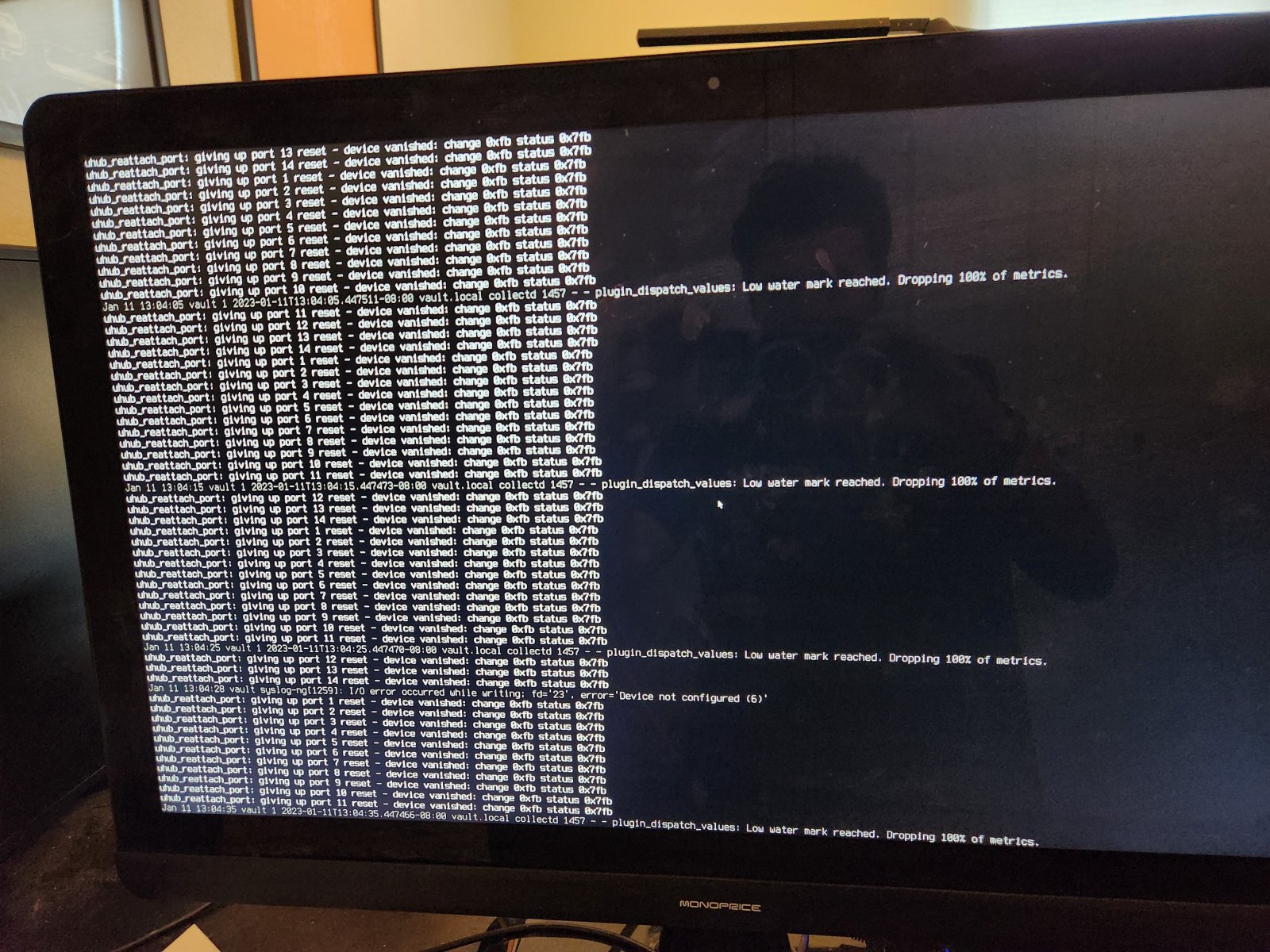
<div class="bbWrapper">First, thank you for taking the time to read.<br /> <br /> <b>Background:</b><br /> <ul> <li data-xf-list-type="ul">Home system for personal documents/photos</li> <li data-xf-list-type="ul">Currently not dependent on this build for any storage due to current issue</li> <li data-xf-list-type="ul">I'm new to FreeBSD, but generally comfortable on the command line (windows developer)</li> <li data-xf-list-type="ul">Cribbed this build from this <a href="https://www.youtube.com/watch?v=boKmZKTKXHc" target="_blank" class="link link--external" rel="nofollow ugc noopener">video</a>, which since visiting these forums may have been a mistake. <i>sigh</i></li> <li data-xf-list-type="ul">I have not been able to reproduce consistently which has made this hard to fix myself</li> <li data-xf-list-type="ul">I did <a href="https://forums.freebsd.org/threads/tip-log-console-messages.10090/" target="_blank" class="link link--external" rel="nofollow ugc noopener">the following</a> to log all console output to a log file as the below messages were not showing up anywhere in the /var/log files that I could find. They still didn't log as expected.</li> </ul><b>Hardware (all purchase new):</b><br /> <br /> I am happy to supply serial numbers upon request, just didn't want to dismantle the box to get to all of them:<br /> <ul> <li data-xf-list-type="ul"><a href="https://www.amazon.com/gp/product/B089D34SZT/ref=ppx_od_dt_b_asin_title_s00?ie=UTF8&amp;psc=1" target="_blank" class="link link--external" rel="nofollow ugc noopener">ASUS ROG Strix B550-I Gaming AMD AM4</a></li> <li data-xf-list-type="ul"><a href="https://www.amazon.com/gp/product/B0876Y2TMZ/ref=ppx_yo_dt_b_asin_title_o00_s03?ie=UTF8&amp;psc=1" target="_blank" class="link link--external" rel="nofollow ugc noopener">AMD Ryzen 3 3100 4-Core</a></li> <li data-xf-list-type="ul"><a href="https://www.amazon.com/gp/product/B0B8TV1QRG/ref=ppx_yo_dt_b_search_asin_title?ie=UTF8&amp;psc=1" target="_blank" class="link link--external" rel="nofollow ugc noopener">SilverStone Technology ECS07</a> (Provide 2 more sata ports, 2 of the WD Gold disks are on this)</li> <li data-xf-list-type="ul"><a href="https://www.amazon.com/gp/product/B07XJLDHW4/ref=ppx_yo_dt_b_asin_title_o06_s00?ie=UTF8&amp;psc=1" target="_blank" class="link link--external" rel="nofollow ugc noopener">G.Skill RipJaws V Series 16GB (2 x 8GB) 288-Pin SDRAM PC4-28800 DDR4 3600</a></li> <li data-xf-list-type="ul"><a href="https://www.amazon.com/gp/product/B01N6JQS8C/ref=ppx_yo_dt_b_asin_title_o08_s00?ie=UTF8&amp;psc=1" target="_blank" class="link link--external" rel="nofollow ugc noopener">Kingston 120GB A400 SATA 3 2.5&quot; Internal SSD SA400S37/120G</a> (OS SSD)</li> <li data-xf-list-type="ul"><a href="https://www.amazon.com/gp/product/B07XDD6GD3/ref=ppx_yo_dt_b_asin_title_o00_s00?ie=UTF8&amp;psc=1" target="_blank" class="link link--external" rel="nofollow ugc noopener">Western Digital 4TB WD Gold</a> (x5, ZFS pool)</li> <li data-xf-list-type="ul"><a href="https://www.amazon.com/gp/product/B097ZKMB21/ref=ppx_yo_dt_b_asin_title_o00_s01?ie=UTF8&amp;psc=1" target="_blank" class="link link--external" rel="nofollow ugc noopener">Intel Optane Memory H10 32GB with SSD Solid State Storage 512GB HBRPEKNX0202AC</a></li> <li data-xf-list-type="ul"><a href="https://www.amazon.com/gp/product/B08LP6WS35/ref=ppx_yo_dt_b_asin_title_o05_s00?ie=UTF8&amp;psc=1" target="_blank" class="link link--external" rel="nofollow ugc noopener">Cooler Master V850 SFX Gold Full Modular, 850W</a></li> <li data-xf-list-type="ul"><a href="https://www.amazon.com/N1-Mini-ITX-Chassis-Computer-Aluminum/dp/B09WZLHCZG" target="_blank" class="link link--external" rel="nofollow ugc noopener">JONSBO N1 Mini-ITX NAS Chassis</a></li> </ul><b>Configuration:</b><br /> <br /> I am happy to supply other configuration/log information as needed.<br /> <ul> <li data-xf-list-type="ul">TrueNAS Version: TrueNAS-13.0-U3.1</li> <li data-xf-list-type="ul">Previously had a SyncThing jail installed but removed, no current jails installed</li> </ul><br /> <b>Description:</b><br /> <br /> The problem will usually start within a 24 hour period of a reboot.<br /> <br /> When the problem occurs, TrueNAS becomes unresponsive. I am unable to see it on the network, the web UI does not connect, you can't reach the login page. Attaching a monitor to the physical box, I see the following cascade of error messages in the console and the console is unresponsive to the keyboard:<br /> <br /> <blockquote data-attributes="" data-quote="" data-source="" class="bbCodeBlock bbCodeBlock--expandable bbCodeBlock--quote js-expandWatch"> <div class="bbCodeBlock-content"> <div class="bbCodeBlock-expandContent js-expandContent "> uhub_reattach_port: giving up port 13 reset - device vanished: change 0xfb status 0x7fb<br /> uhub_reattach_port: giving up port 14 reset - device vanished: change 0xfb status 0x7fb<br /> uhub_reattach_port: giving up port 1 reset - device vanished: change 0xfb status 0x7fb<br /> uhub_reattach_port: giving up port 2 reset - device vanished: change 0xfb status 0x7fb<br /> uhub_reattach_port: giving up port 3 reset - device vanished: change 0xfb status 0x7fb<br /> uhub_reattach_port: giving up port 4 reset - device vanished: change 0xfb status 0x7fb<br /> uhub_reattach_port: giving up port 5 reset - device vanished: change 0xfb status 0x7fb<br /> uhub_reattach_port: giving up port 6 reset - device vanished: change 0xfb status 0x7fb<br /> uhub_reattach_port: giving up port 7 reset - device vanished: change 0xfb status 0x7fb<br /> uhub_reattach_port: giving up port 8 reset - device vanished: change 0xfb status 0x7fb<br /> uhub_reattach_port: giving up port 9 reset - device vanished: change 0xfb status 0x7fb<br /> uhub_reattach_port: giving up port 10 reset - device vanished: change 0xfb status 0x7fb<br /> Jan 11 13:04:05 vault 1 2023-01-11T13:04:05.447511-08:00 vault.local collectd 1457 - - plugin_dispatch_values: Low water mark reached. Dropping 100% of metrics. </div> <div class="bbCodeBlock-expandLink js-expandLink"><a role="button" tabindex="0">Click to expand...</a></div> </div> </blockquote><br /> Please see 'console-image.jpg' attached for more context. I would supply the full text but it's not captured in the /var/log files.<br /> <br /> <ul> <li data-xf-list-type="ul">I've found similar but not identical error messaging here on the forums</li> <li data-xf-list-type="ul">I have an intuition this is likely a hardware issue (or maybe bios setting?) based on the problems people tend to have around incompatibility with their hardware and TrueNAS, but I'm interested in a professional's opinion.</li> </ul>I also don't entirely understand the error message as typically this box is headless and has nothing in any of it's USB ports. I did find this <a href="https://bugs.freebsd.org/bugzilla/show_bug.cgi?id=237666" target="_blank" class="link link--external" rel="nofollow ugc noopener">bug report on the FreeBSD forum</a>.<br /> <br /> <b>Things I've Tried</b><br /> <br /> <ul> <li data-xf-list-type="ul">Replacing the M.2 SATA Expansion Card, previously used this <a href="https://www.amazon.com/gp/product/B07XYSK3QG/ref=ppx_yo_dt_b_search_asin_title?ie=UTF8&amp;psc=1" target="_blank" class="link link--external" rel="nofollow ugc noopener">one</a>, but I believe I was still having the issue at this time (I've been debugging this on and off for awhile)</li> <li data-xf-list-type="ul">Moving the OS Kingston drive off the ECS07 expansion card and directly used the onboard SATA connectors</li> <li data-xf-list-type="ul">Setup logging all console messages to try and capture the full log as PGUP/PGDOWN stops working once this flood of errors starts, logs didn't seem to have the attached picture messages</li> <li data-xf-list-type="ul">Checking the HDD drives SMART results (They looked fine to me but, again, amateur hour here, can provide)</li> </ul><br /> <b>Resolutions</b><br /> <br /> Currently the only thing that 'resolves' this issue is a hard reboot.</div>
 

Attachments

  • console-image.jpg
    console-image.jpg
    459.4 KB · Views: 513

Ericloewe

Server Wrangler
Moderator
Joined
Feb 15, 2014
Messages
20,194
<div class="bbWrapper"><blockquote data-attributes="member: 121600" data-quote="benk87" data-source="post: 736778" class="bbCodeBlock bbCodeBlock--expandable bbCodeBlock--quote js-expandWatch"> <div class="bbCodeBlock-title"> <a href="/community/goto/post?id=736778" class="bbCodeBlock-sourceJump" rel="nofollow" data-xf-click="attribution" data-content-selector="#post-736778">benk87 said:</a> </div> <div class="bbCodeBlock-content"> <div class="bbCodeBlock-expandContent js-expandContent "> Cribbed this build from this <a href="https://www.youtube.com/watch?v=boKmZKTKXHc" target="_blank" class="link link--external" rel="nofollow ugc noopener">video</a>, which since visiting these forums may have been a mistake. <i>sigh</i> </div> <div class="bbCodeBlock-expandLink js-expandLink"><a role="button" tabindex="0">Click to expand...</a></div> </div> </blockquote>Yeah, LTT is not great for advice on what to do. On the flip side, if they tell you not to do something, you should probably listen because they deemed it to crazy even for themselves. <br /> <br /> I seem to recall that AMD processors were having trouble with USB, with various mitigation options. In your case, perhaps you can just disable the USB ports in the system setup.</div>
 

benk87

Cadet
Joined
Jan 11, 2023
Messages
6
<div class="bbWrapper">Hey! Thanks for the quick response.<br /> <br /> A few follow on questions, respond at your leisure:<br /> <br /> <ul> <li data-xf-list-type="ul">To learn more about the AMD processor/USB issues and the various mitigation options, I'm assuming it best to crawl the FreeBSD forums?</li> <li data-xf-list-type="ul">To be crystal clear about your suggestion, you're saying disable the USB ports via the BIOS? Or is there a separate 'system setup' place I should be looking at.</li> </ul>Thanks again.</div>
 

Ericloewe

Server Wrangler
Moderator
Joined
Feb 15, 2014
Messages
20,194
<div class="bbWrapper"><blockquote data-attributes="member: 121600" data-quote="benk87" data-source="post: 736784" class="bbCodeBlock bbCodeBlock--expandable bbCodeBlock--quote js-expandWatch"> <div class="bbCodeBlock-title"> <a href="/community/goto/post?id=736784" class="bbCodeBlock-sourceJump" rel="nofollow" data-xf-click="attribution" data-content-selector="#post-736784">benk87 said:</a> </div> <div class="bbCodeBlock-content"> <div class="bbCodeBlock-expandContent js-expandContent "> To learn more about the AMD processor/USB issues and the various mitigation options, I'm assuming it best to crawl the FreeBSD forums? </div> <div class="bbCodeBlock-expandLink js-expandLink"><a role="button" tabindex="0">Click to expand...</a></div> </div> </blockquote>Possibly, but it's not an OS thing, rather a general problem. <br /> <br /> <blockquote data-attributes="member: 121600" data-quote="benk87" data-source="post: 736784" class="bbCodeBlock bbCodeBlock--expandable bbCodeBlock--quote js-expandWatch"> <div class="bbCodeBlock-title"> <a href="/community/goto/post?id=736784" class="bbCodeBlock-sourceJump" rel="nofollow" data-xf-click="attribution" data-content-selector="#post-736784">benk87 said:</a> </div> <div class="bbCodeBlock-content"> <div class="bbCodeBlock-expandContent js-expandContent "> To be crystal clear about your suggestion, you're saying disable the USB ports via the BIOS? </div> <div class="bbCodeBlock-expandLink js-expandLink"><a role="button" tabindex="0">Click to expand...</a></div> </div> </blockquote>In the system firmware setup menu, often still called the BIOS setup menu, yes.</div>
 

benk87

Cadet
Joined
Jan 11, 2023
Messages
6
<div class="bbWrapper">Thank you for the clarifications!<br /> <br /> A quick update, I disabled all USBs last night in the system firmware setup menu last night.<br /> <br /> We're crossing about 15 hours since that change and we're not seeing issues.<br /> <br /> I had the box continue to sync files to a cloud service to give it something to do in the mean time.<br /> <br /> I will update again once we clear 48 hours for the next person who finds this thread for the same issue.</div>
 

benk87

Cadet
Joined
Jan 11, 2023
Messages
6
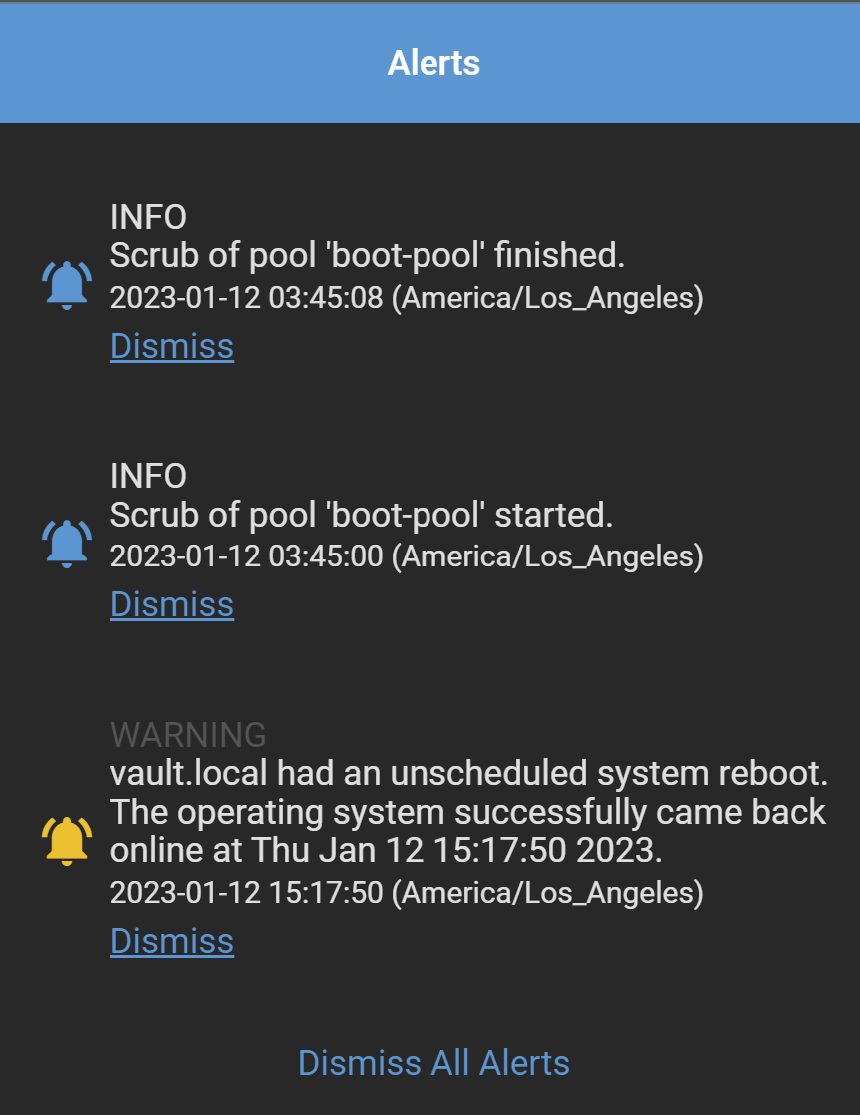
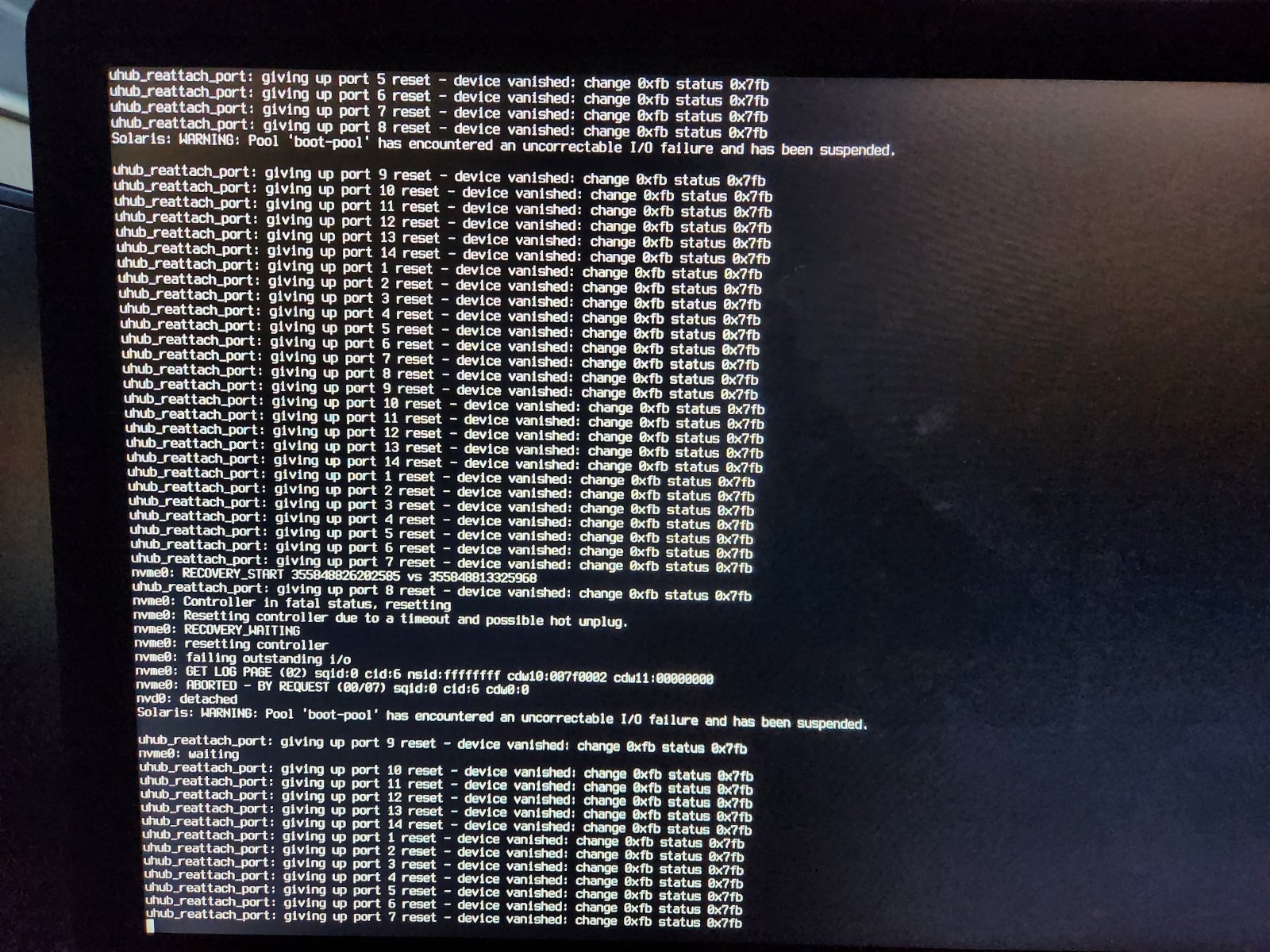
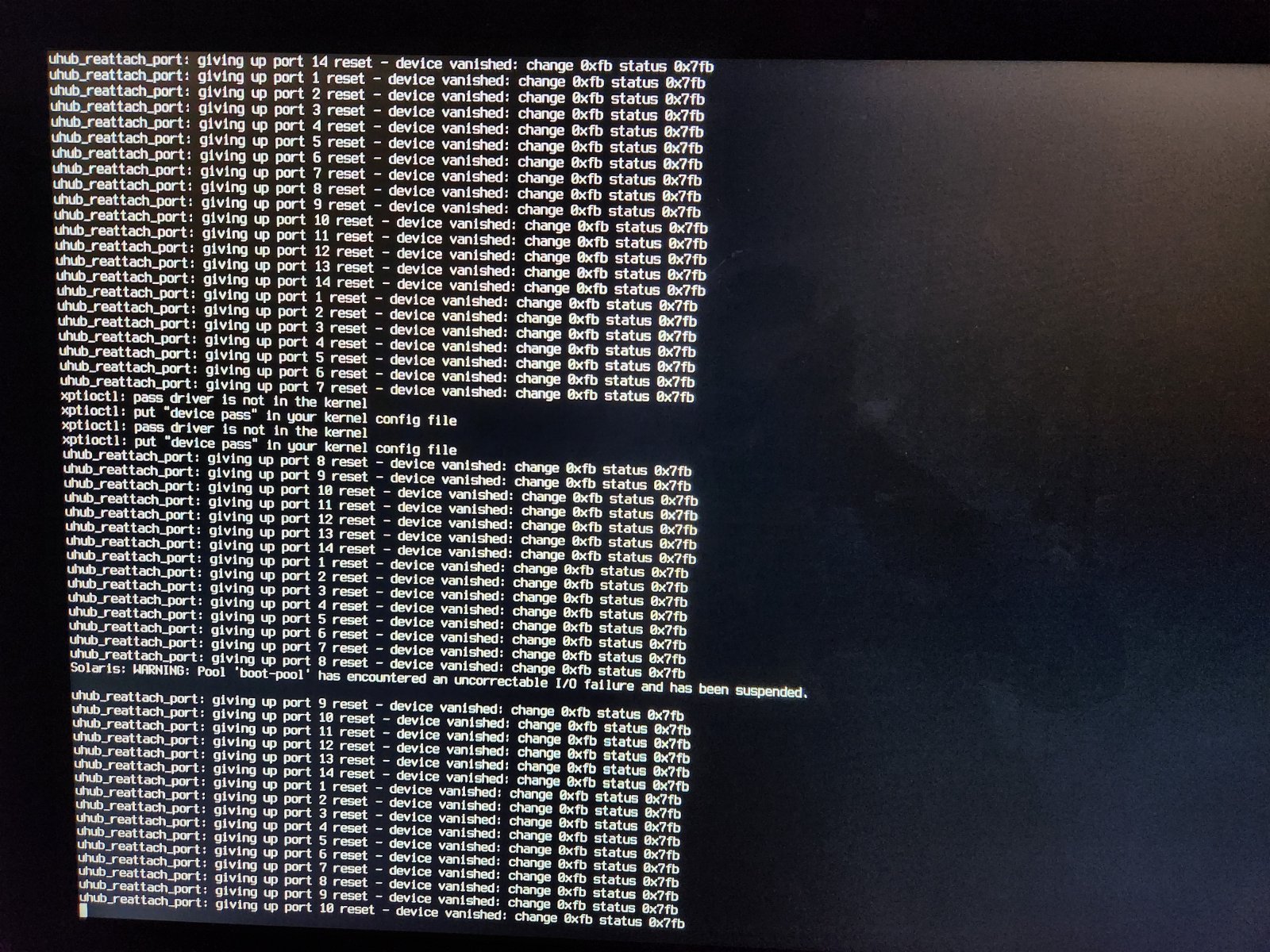
<div class="bbWrapper">Good news bad news.<br /> <br /> Bad news, it bailed again. Good news though is I managed to catch it as it happened (or very shortly afterwards) which gave me access to some new error messages I hadn't caught before (please see comprehensive console log in screenshots):<br /> <br /> Some entries of note:<br /> <blockquote data-attributes="" data-quote="" data-source="" class="bbCodeBlock bbCodeBlock--expandable bbCodeBlock--quote js-expandWatch"> <div class="bbCodeBlock-content"> <div class="bbCodeBlock-expandContent js-expandContent "> xptioctl: pass driver is not in the kernel<br /> xptioctl: put &quot;device pass&quot; in your kernel config file </div> <div class="bbCodeBlock-expandLink js-expandLink"><a role="button" tabindex="0">Click to expand...</a></div> </div> </blockquote><br /> <blockquote data-attributes="" data-quote="" data-source="" class="bbCodeBlock bbCodeBlock--expandable bbCodeBlock--quote js-expandWatch"> <div class="bbCodeBlock-content"> <div class="bbCodeBlock-expandContent js-expandContent "> Solaris: WARNING: Pool 'boot-pool' has encountered an uncorrectable I/O failure and has been suspended </div> <div class="bbCodeBlock-expandLink js-expandLink"><a role="button" tabindex="0">Click to expand...</a></div> </div> </blockquote><br /> <blockquote data-attributes="" data-quote="" data-source="" class="bbCodeBlock bbCodeBlock--expandable bbCodeBlock--quote js-expandWatch"> <div class="bbCodeBlock-content"> <div class="bbCodeBlock-expandContent js-expandContent "> nvme0: Controller in fatal status, resetting<br /> nvme0: Resetting controller due to a timeout and possible hot unplug.<br /> nvme0: RECOVERY_WAITING<br /> nvme0: resetting controller<br /> nvme0: failing outstanding i/o </div> <div class="bbCodeBlock-expandLink js-expandLink"><a role="button" tabindex="0">Click to expand...</a></div> </div> </blockquote><br /> <blockquote data-attributes="" data-quote="" data-source="" class="bbCodeBlock bbCodeBlock--expandable bbCodeBlock--quote js-expandWatch"> <div class="bbCodeBlock-content"> <div class="bbCodeBlock-expandContent js-expandContent "> nvd0: detached </div> <div class="bbCodeBlock-expandLink js-expandLink"><a role="button" tabindex="0">Click to expand...</a></div> </div> </blockquote><br /> nvme0 = <a href="https://www.amazon.com/gp/product/B097ZKMB21/ref=ppx_yo_dt_b_asin_title_o00_s01?ie=UTF8&amp;psc=1&amp;ozlp-20" target="_blank" class="link link--external" rel="nofollow ugc noopener">Intel Optane Memory H10 32GB with SSD Solid State Storage 512GB HBRPEKNX0202AC</a><br /> <br /> nvd0 = apparently nvme0 by a different name?<br /> <br /> boot-pool is on ada04<br /> <br /> Attached screenshot of the notifications after hard restart.<br /> Attached smartctl results for each storage disk, they are all marked passed.<br /> <br /> For context, I wasn't doing any heavy load on the truenas when this occurred, it had been awhile since I had done anything with it, and I had just created a few folders on my samba share before it went belly up.<br /> <br /> --<br /> <br /> From what I can gather, it looks like both the boot-pool (ada4) and and the cache (nvme) are disconnecting and being put into a fatal/suspended status? A few thoughts:<br /> <br /> <ul> <li data-xf-list-type="ul">I could potentially simplify the pool by yanking the nvme0 and see if the problem resides with that nvme or the m.2 slot it's plugged into.</li> <li data-xf-list-type="ul"><a href="https://www.truenas.com/community/threads/resilvered-and-degraded-state-messages-what-is-happening-to-my-drivers-need-i-replace-any.70541/" class="link link--internal">I saw some similar error messages in the forums</a> searching for the xptioctl messages mentioning potentially a bad cable (though their issue looked more like a drive problem). When I moved the boot drive off the <a href="https://www.amazon.com/gp/product/B0B8TV1QRG/ref=ppx_yo_dt_b_search_asin_title?ie=UTF8&amp;psc=1&amp;ozlp-20" target="_blank" class="link link--external" rel="nofollow ugc noopener">SilverStone Technology ECS07</a>, I changed the cable at that time, so that seems unlikely.</li> </ul></div>
 

Attachments

  • ada1.txt
    6.1 KB · Views: 462
  • ada2.txt
    6.1 KB · Views: 443
  • ada3.txt
    10.7 KB · Views: 501
  • ada4.txt
    6.3 KB · Views: 459
  • ada5.txt
    6.1 KB · Views: 480
  • nvme0.txt
    2.7 KB · Views: 562
  • Screenshot 2023-01-12 172917.png
    Screenshot 2023-01-12 172917.png
    98.4 KB · Views: 526
  • 20230112_171242.jpg
    20230112_171242.jpg
    508.8 KB · Views: 584
  • 20230112_171224.jpg
    20230112_171224.jpg
    552.3 KB · Views: 539
  • ada0.txt
    6.1 KB · Views: 494

Ericloewe

Server Wrangler
Moderator
Joined
Feb 15, 2014
Messages
20,194
<div class="bbWrapper"><blockquote data-attributes="member: 121600" data-quote="benk87" data-source="post: 737044" class="bbCodeBlock bbCodeBlock--expandable bbCodeBlock--quote js-expandWatch"> <div class="bbCodeBlock-title"> <a href="/community/goto/post?id=737044" class="bbCodeBlock-sourceJump" rel="nofollow" data-xf-click="attribution" data-content-selector="#post-737044">benk87 said:</a> </div> <div class="bbCodeBlock-content"> <div class="bbCodeBlock-expandContent js-expandContent "> nvme0 = <a href="https://www.amazon.com/gp/product/B097ZKMB21/ref=ppx_yo_dt_b_asin_title_o00_s01?ie=UTF8&amp;psc=1&amp;ozlp-20" target="_blank" class="link link--external" rel="nofollow ugc noopener">Intel Optane Memory H10 32GB with SSD Solid State Storage 512GB HBRPEKNX0202AC</a><br /> <br /> nvd0 = apparently nvme0 by a different name? </div> <div class="bbCodeBlock-expandLink js-expandLink"><a role="button" tabindex="0">Click to expand...</a></div> </div> </blockquote>The nvme driver deals with talking to the SSD. The nvd driver provides access to the SSD's NVMe namespaces in a similar way to other drivers wired up to GEOM, so that you can do the same things (software RAID without ZFS, etc.). The nda driver is also available as an alternative to nvd, and I think it bypasses GEOM for extra performance with fewer features.<br /> <br /> An NVMe SSD will have one or more namespaces, think of them as partitions, SCSI LUNs, datasets, etc. <a href="https://www.truenas.com/community/resources/nvme-ssd-namespaces-support-table.178/" class="link link--internal">Most consumer SSDs only support a single one, but enterprise SSDs often support multiple namespaces</a>.</div>
 

benk87

Cadet
Joined
Jan 11, 2023
Messages
6
<div class="bbWrapper">Thanks for the context!<br /> <br /> For historical purposes:<br /> <br /> I went further down the line of reasoning on the usb support issue and found the following <a href="https://www.tomshardware.com/news/amd-suggest-possible-fixes-for-usb-connectivity-issues" target="_blank" class="link link--external" rel="nofollow ugc noopener">article</a>.<br /> <br /> As you can see it names both the motherboard and cpu combination that should be hit by this problem. There are also the official work arounds listed in that article.<br /> <br /> In a following <a href="https://www.pcmag.com/news/amd-locates-root-cause-of-usb-issues-on-b550-x570-motherboards" target="_blank" class="link link--external" rel="nofollow ugc noopener">article</a> it names AGESA 1.2.0.2 as the update to be on the lookout for to solve this root cause USB issue.<br /> <br /> Unfortunately, per the <a href="https://rog.asus.com/motherboards/rog-strix/rog-strix-b550-i-gaming-model/helpdesk_bios/" target="_blank" class="link link--external" rel="nofollow ugc noopener">BIOS update page</a> for the 550, I'm already at AGESA 1.2.0.3.<br /> <br /> My next steps are to update the BIOS to latest as version 2803 seems to again iterate the AGESA version to 1.2.0.7.<br /> <br /> Following that, if I still experience the USB issues, I'll be attempting the workarounds outlined in the first article.<br /> <br /> I will update when I'm able to do the BIOS update/work around work.<br /> <br /> Thanks again for your time!</div>
 

benk87

Cadet
Joined
Jan 11, 2023
Messages
6
<div class="bbWrapper">Update:<br /> <br /> I have reached 72 hours~ since my last boot without running into the above issue since updating the BIOS.<br /> <br /> Some other things of note:<br /> <br /> <ol> <li data-xf-list-type="ol">There's bad documentation on this motherboard with regard to how the BIOS update usb slot and button works. While the docs say it will flash 3 times to let you know it's started the update, it in fact will continually flash until it completes, and then finally will boot the computer for you. It might be obvious to some readers, but to those who need to hear this <b>do not pull the flash drive while the bios update button continues to flash, you will interrupt and temporarily brick your motherboard which will subsequently begin to return a status LED that says there's something wrong with DRAM on boot, this is not true, you have a borked BIOS. </b>(this is reversable, but is an easy way to give yourself another headache, ask me how I know.)</li> <li data-xf-list-type="ol">It's likely just my PC case but I found that the BIOS flash button on the back of the motherboard was very easy to keep permanently depressed by the IO shroud, you may need to do some surgery on the shroud to get it to play nicely.</li> </ol></div>
 
Top